Thursday, 6 August 2015

Comparing Oracle VERSIONS

Oracle verions: 2,3,4,5,6,7,8, 8i, 9i, 10g, 10g release2, 11g ( fror linux and MS windows), 12c ( Linux, Solaris and Windows)
 'i' and 'g' part of the version name just represents either "Internet" or "Grid"
c for "cloud"

History:
  • 1990: the release of Oracle Applications release 8[59]
  • 1992: Oracle version 7 appeared with support for referential integrity, stored procedures and triggers.
  • 1997: Oracle Corporation released version 8, which supported object-oriented development and multimedia applications.
  • 1999: The release of Oracle8i aimed to provide a database inter-operating better with the Internet (the i in the name stands for "Internet"). The Oracle8i database incorporated a native Java virtual machine (Oracle JVM, also known as "Aurora").[63]
  • 2000: Oracle E-Business Suite 11i pioneers integrated enterprise application software[59]
  • 2001: Oracle9i went into release with 400 new features, including the ability to read and write XML documents. 9i also provided an option for Oracle RAC, or "Real Application Clusters", a computer-cluster database, as a replacement for the Oracle Parallel Server (OPS) option.
  • 2002: the release of Oracle 9i Database Release 2 (9.2.0)[64]
  • 2003: Oracle Corporation released Oracle Database 10g, which supported regular expressions. (The g stands for "grid"; emphasizing a marketing thrust of presenting 10g as "grid computing ready".)
  • 2005: Oracle Database 10.2.0.1—also known as Oracle Database 10g Release 2 (10gR2)—appeared.
  • 2006: Oracle Corporation announces Unbreakable Linux[59] and acquires i-flex
  • 2007: Oracle Database 10g release 2 sets a new world record TPC-H 3000 GB benchmark result[65]
  • 2007: Oracle Corporation released Oracle Database 11g for Linux and for Microsoft Windows.
  • 2013: Oracle Corporation released Oracle Database 12c[66] for Linux, Solaris and Windows. (The c stands for "cloud".)
------------

At the moment the actual version of Oracle database server is 12c (12.1.0.2) that includes the following remarkable features:
- Oracle Database In-Memory
- Oracle Big Data SQL
- Oracle JSON Document Store
- Oracle REST Data Services
- Improvements to Oracle Multitenant
- Advanced Index Compression
- Zone Maps
- Approximate Count Distinct
- Attribute Clustering
- Full Database Caching
- Rapid Home Provisioning
I’ll also try to place below my first draft of the history of Oracle database innovations and version releases.
2013 – Oracle Database 12c R1
- New Multitenant and Pluggable database concept
- Adaptive Query Optimization
- Online Stats Gathering
- Temporary UNDO
- In Database Archiving
- Invisible Columns
- PGA Aggregate Limit setting
- DDL Logging
- Flash ASM
-
2009 – Oracle 11g2
- SQL Performance Analyzer
- Deferred segment creation
- Smart Flash Cache
- Automatic block repair from Standby DB
- Edition Based Redefinition
- Oracle RAC One Node
- Oracle Restart
- Instance Caging
- ASM Cluster File System (ACFS)
2007 – Oracle 11g
- Real-Time SQL Monitoring
- Query Result Cache
- Advanced Compression Option
- SecureFiles LOBs
- Flashback Data Archive
- Data Recovery Advisor
- Automatic Diagnostic Repository (ADR)
-
2005 – Oracle 10gR2
- Transparent Data Encryption
- Transportable Tablespace Support
- ASM Command-Line (asmcmd) utility
- OPatch the Patching Tool
- Database Replay
- Active Session History (ASH) Report
- Automatic Segment Advisor
-
2003 – Oracle 10g: first Grid computing database
- Grid computing – an extension of Oracle RAC
- Automated Storage Management (ASM)
- New self-tuning features (AWR, ADDM)
- Recycle bin
- New database job scheduler (DBMS_SCHEDULER)
- Datapump utility
- SYSAUX tablespace
-
2002 – Oracle 9iR2
- Locally Managed SYSTEM tablespaces
- Data segment compression
- Oracle Streams
- Cluster file system for Windows and Linux
- Logical standby databases with Data Guard
- Default Accounts locked on install
-
2001 – Oracle 9i
- First database to complete the 3 terabyte TPC-H world record
- First database with built-in web services; with integrated data mining; with Hash, Range, Composite and List partitioning; with dynamic memory management; with built-in workflow
- Oracle RAC introduced
- Automated System Managed Undo
- Flashback query
- Oracle Data Guard (new name)
- Dynamic Memory Management
- On-line table and index reorganization
- Resumable backups and statements
-
1999 Oracle8i: First internet ready database
- Integrated JavaVM
- Oracle iFS (Internet File System)
- First database with XML support
- First RDBMS ported to Linux
- Statspack utility
- PL/SQL encrypt/decrypt package
- CASE statement in SQL
- User schema concept
- CURSOR_SHARING parameter
- Fast Start recovery
- Log Miner functionality
- OPS Cache Fusion
- Virtual Private Database (VPD)
- Temporary tables
- Drop column on table
- Function based indexes
-
1998
- First database with Java support
- Breaks the 100,000 TPC-C barrier
1997 Oracle8: First Web-enabled database
- Object types
- SQL3 standard
- Parallel DML statements
- Index Organized tables (IOTs)
- Reverse Key indexes
- ROWID format
- Advanced Queuing
- Recovery manager (RMAN)
1996 – Oracle 7.3
- Standby Database
- Bitmapped Indexes
- Partitioned Views
- Index rebuilds
- db_verify utility
- Spatial and Context Data Options
- Histograms
- Oracle trace
-
1995 – First 64-bit RDBMS
1992 – Version 7 
- First a full applications implementation methodology (AIM)
- Partitioning introduced
- Stored procedures and triggers
- Referential integrity with Foreign Keys
-
1988 – Version 6 
- First row – level locking
- First to introduce PL/SQL
- On-line database backups
- B*Tree indexes implemented
- Concept of tablespaces introduced
- Rollback Segments introduced
1987 – First SMP database
1985 – Version 5
- First parallel server database
- First client-server database
- First distributed queries
1984 – Version 4: First database with read consistency
Read consistency concept enabled readers and writers to access the same data without one blocking the other.
1983 – Version 3: First portable Oracle Database
- First portable database offered a choice of what hardware and operating system platform to run on
- First database written entirely in C
- First VAX-mode database
1979 – Version 2: first Oracle Database
First RDBMS version released in 1979 was called Oracle V2. Why not V1? There were two reasons for that: a concern that a version 1 would not awake potential customers’ interest and to show a pseudo- leadership compared to the competitors. First version of RDBMS was created with assembler.
So that was the Roadmap of Oracle Database version releases, current status and the brief history. In case of minor mistakes please correct in comments and I’ll update it. Thanks

Wednesday, 5 August 2015

How to make cognos reports reusable - Explore the new idea of authoring Cognos reports – Part 1

Make query reusable

1 Introduction
2 Problem of current approach
2.1 Current approach
2.2 The major problems
2.2.1 Difficult to author
2.2.2 Difficult to maintain
2.2.3 Difficult to migrate
3 Solution
3.1 Terminology
 3.1.1 Query
 3.1.2 Data container
 3.1.3 Page
 3.1.4 Page set
3.2 Approach
3.2.1 Make query reusable
3.2.2 Make data container reusable
3.2.3 Make page reusable
4 Implementation
4.1 Sample
4.2 Make query reusable
4.2.1 Make query item reusable
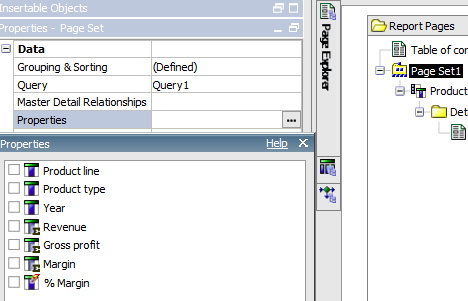
4.2.1.1 Case 1: Page set
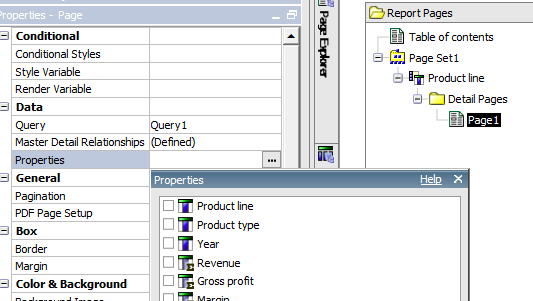
4.2.1.2 Case 2: Page
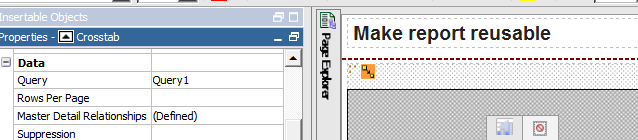
4.2.1.3 Case 3: data container – Crosstab
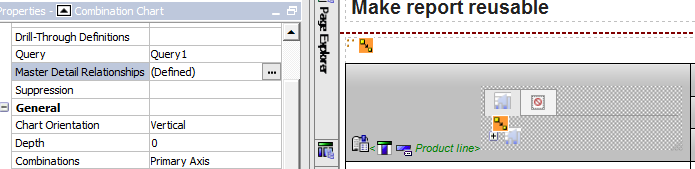
4.2.1.4 Case 4: data container – Product Line Chart
4.2.1.5 Case 5: data container – Product Type Chart
4.2.2 Make Filter reusable
4.2.2.1 Make logic filter reusable
4.2.2.2 Make prompt filter reusable
4.2.3 Use property to control query
4.2.3.1 Case 1: page set
4.2.3.2 Case 2: page
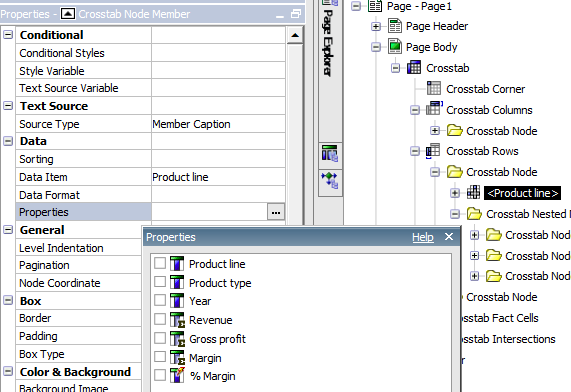
4.2.3.3 Case 3: Crosstab Node member
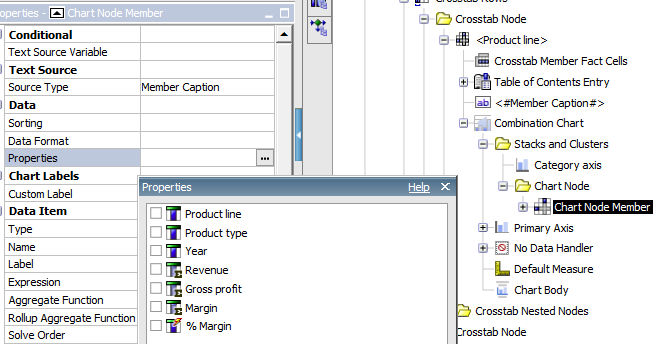
4.2.3.4 Case 4: Chart Node member

Introduction

The initial motive of researching a new concept is from my consulting job as Cognos consultant, where I’ve spent most of my time to author Cognos reports. It occurs to me that current approach of authoring and migrating reports doesn’t work properly. The real issue is that we don’t make Cognos reports reusable. Given that Cognos report engine doesn’t provide report reusability, this document is intended to explore the practical approach to make report reusable based on current report engine.

Problem of current approach


Current approach


Each report is independently authored by Cognos report developer based on framework manager. As business users want to see report from different angles, many reports based on same framework manager model are developed. The most used method to author these similar reports is copy and paste.

The major problems

Difficult to author

As there is no common library provided, report authors need to figure out where these reports are and somehow to filter out the needed part.  Such a part including query and report is written in the context of the report. There are two tasks to be done: 1) report developers need to somehow understand functionalities of that report; and 2) Report developers need to retrofit these queries and reports into their own report.

Difficult to maintain

As part of newly develop report is copied from another report, there will result in many copies of same logic. When business requirement changes, report developer needs to change all these copies. There are a few challenges:
Need to figure out how many such copies are request to change
Change can’t apply with simple copy and paste, as these copies are not exactly same in different report.

Difficult to migrate

Migration happens when Framework manager changes, or version changes. The similar issues occur as when redeveloper deal with maintenance.

Solution

Terminology

Query

It is Cognos query, regardless of when it is relational and dimensional. It can be complicated and simple query.

Data container

The typical data container is list, crosstab, and chart.

Page

Page contains one or more than one data containers. By the way, query can be used at page level.

Page set

Page set contains one or more than one pages. In addition, burst report can be considered as page set as well.

Approach

Make query reusable

Query is used in report at all levels, including page set (including burst), page and data containers. The query designed in report is different from query executed against data sources. Why? Cognos only takes query items that are used in report to generate real query against data source. Therefore, you can design only one query with many data items, which can serve all data containers. In other word, you can make query reusable for many different data containers, pages or even page sets.

Make data container reusable

In case when more than one data container, such a chart are used in a page, you can use master detail relationship. Define a single chart with all formats, along with title, and you can make this chart reusable. if such a data container is used by multiple pages, then you can use page set make it reusable.  Furthermore, if it is used by multiple reports, we can make this container in a common used library.

Make page reusable

The similar idea can be applied for page. In multiple page situation, page set can be used as parent of pages and assemble report. Again, in case when this page used in multiple report, it should copied into common library.

Implementation

The most important point is to make query reusable, as it is the foundation of this whole reusability approach. In order to illustrate this approach, a sample is introduced; please download report specification for review.

Sample

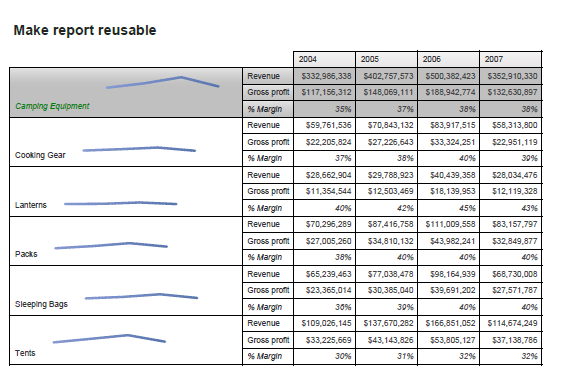
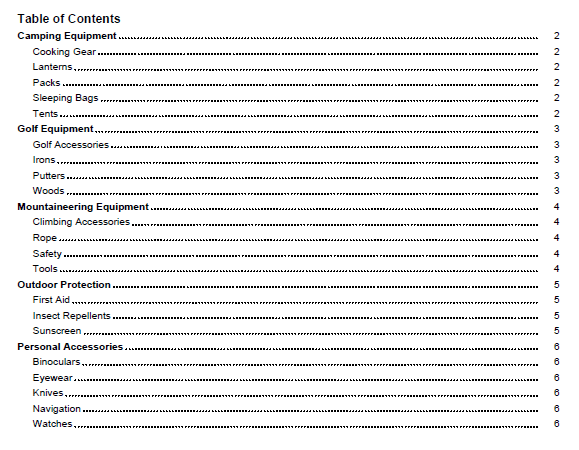
Create a report book to loop through all product line. This report involves page set, page, crosstab and chart. It uses a single query.
Sample page for camping equipment

Query 1
Page set

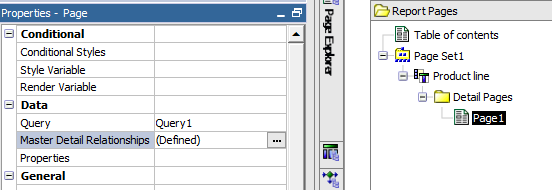
Page

Data container / Crosstab / Chart

Make query reusable


A query is composed of query item and filters.

Make query item reusable

As the whole sample report uses a single defined query Query1, it is actually used by following cases by Cognos engine

Case 1: Page set


Product line X
Product type
Year
Revenue
Gross profit
Margin
% Margin


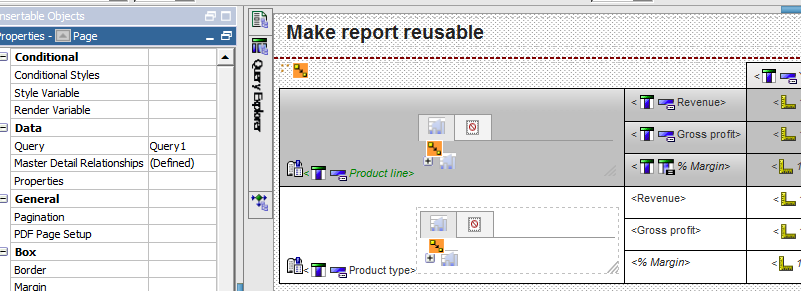
Case 2: Page


Product line X
Product type
Year
Revenue
Gross profit
Margin
% Margin


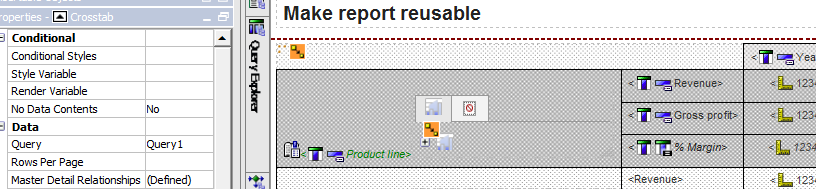
Case 3: data container – Crosstab


Product Line crosstab node member
Product line
X
Product type
Year
X
Revenue
X
Gross profit
X
Margin
X
% Margin
X


Product Type crosstab node member
Product line
X
Product type
X
Year
X
Revenue
X
Gross profit
X
Margin
X
% Margin
X


Case 4: data container – Product Line Chart


Product line
X
Product type
Year
X
Revenue
X
Gross profit
Margin
% Margin


Case 5: data container – Product Type Chart

Product line
Product type
X
Year
X
Revenue
X
Gross profit
Margin
% Margin


Make Filter reusable

There are two different filters, logic filter and prompt filters. There was some detail sample in old post

Make logic filter reusable

There are two ways to make logic filter reusable. Using Cognos sample, assume that revenue can be calculated based on order methods as follows:
If Region  is  'Americas', only Order method type 'Fax','Mail' are included
If Region  is  'Asia Pacific',  only Order method type 'E-mail','Web' are included
All other regions, all Order method types are included

Conditional logic filter based on prompt

case  when (?pRegion? = 'Americas')     
then  ([Sales (query)].[Order method].[Order method type] in ('Fax','Mail') )
         when (?pRegion? = 'Asia Pacific')
then  ([Sales (query)].[Order method].[Order method type] in ('E-mail','Web') )
         else (1=1)
end


(?Level? = 'SBR' and ?TerritoryId? in ('2101','2102') and [Fact Table].[Dim Table].[Territory Id] in ('2101','2102')) or (?Level? = 'SBR' and ?TerritoryId? not in ('2101','2102') and [Fact Table].[Dim Table].[Territory Id] = ?TerritoryId?) or (?Level? <> 'SBR' and 1=1)


Conditional logic filter with built in business logic

( ([Sales (query)].[Retailers].[Region] ='Americas'
       and [Sales (query)].[Order method].[Order method type] in ('Fax','Mail'))
       or ([Sales (query)].[Retailers].[Region] <>'Americas' and 1=1))
AND
( ([Sales (query)].[Retailers].[Region] ='Asia Pacific'
and [Sales (query)].[Order method].[Order method type] in ('E-mail','Web'))
or ([Sales (query)].[Retailers].[Region] <>'Asia Pacific' and 1=1))

Make prompt filter reusable

The key concept is to make filter as optional filter. It will turn query into a similar behavior as query items. For example, define three optional filter p_ProductLine, p_ProductType and p_Product. It will end up all following 8 combinations, theoretically.
1
No filters
2
p_ProductLine
3
p_ProductType
4
p_Product
5
p_ProductLine, p_ProductType
6
p_ProductType ,p_Product
7
p_ProductLine,p_Product
8
p_ProductLine, p_ProductType ,p_Product


Use property to control query

Case 1: page set


Case 2: page


Case 3: Crosstab Node member


Case 4: Chart Node member

Wednesday, 29 July 2015

IBM Cognos Proven Practices: IBM Cognos BI – Working with Multiple Relational Data Sources

Introduction

Purpose

This document will provide guidelines around working with multiple relational data sources in Framework Manager and recommendations on how to improve performance in various scenarios.

Applicability

This document was written and tested against IBM Cognos 8.4.1 and IBM Cognos 10.1.

Exclusions and Exceptions

This document does not cover working with multiple OLAP sources.

Assumptions

This document assumes readers have experience with IBM Cognos BI, in particular IBM Cognos Report Studio and IBM Cognos Framework Manager.

Overview

Many organizations are faced with disparate data sources and the task of trying to consolidate this information for reporting and analysis. Although you may want to consolidate all your data into a single relational database for reporting purposes, it may not be feasible, financially viable, or may take quite some time to implement and require an interim BI solution.
IBM Cognos BI provides facilities to bring these disparate data sources together for reporting purposes, but there are several considerations that should be taken into account before embarking on a BI project.
This document will look at the different ways of dealing with disparate data sources and identify the pros and cons to each method. It will also provide tips on how to reduce performance impact where applicable.

Data Access Strategies

Before beginning data access to your company's data for reporting purposes, you may want to ask some of the following questions with regard to the data and how it will be consumed.
  • How fresh does the data need to be? Are you reporting on yearly, quarterly, monthly, weekly, daily, hourly, or even up to the second data? Knowing this information can help you decide how to access or store your reporting data. Is a data mart or warehouse the way to go, can a cube be used, or must you go against live data?
  • Will users of the data mainly look at summarized data or require an interactive experience (drill up and down through the data)? If so, then perhaps an OLAP package or dimensionally modeled relational (DMR) package should be considered. See DMR note below for more information.
  • Is the data available able to support your business questions? For example, lack of conformed product data throughout the company can prevent querying product metrics across the divisions in the company. Product data in one division should mean and be represented the same way in all divisions. This way metrics from all divisions can be compared through the conformed product data.
These questions are just some examples of the challenges you may be faced with when trying to implement a BI project. Although OLAP technology has been mentioned, this document will focus on accessing multiple relational data sources only.
Note: Dimensionally modeled relational (DMR) modelling is a capability that IBM Cognos Framework Manager provides allowing you to specify dimensional information for relational metadata. This allows for OLAP-style queries. Where possible, using OLAP technologies will typically provide better performance, but DMR may sometimes be appropriate where smaller data sets are concerned (one less technology to implement in the project) or if OLAP-style queries are required on live data.

Do you Really Need to Create Joins Between Databases?

One of the first questions you will want to ask when dealing with disparate data sources is, “do I actually need to join these data sources together?” Do you simply require displaying the data in the same dashboard or report, but without a physical join? Each database can have it's own query in a dashboard or dashboard-style report and be displayed along side each other without a physical joining of the data. In other words, co-locate the data. For example, executives may want to see the weekly correlation between weather statistics and outdoor product sales. Each is contained in a different database. A join between these two databases may not be necessary if they just want to see what the weather was on a given day of sales and quickly see a visual trend of increased sales on warmer days. Each of these queries can be represented in a list or graph and displayed side-by-side in a dashboard or dashboard-style report.
In these types of scenarios, performance concerns due to local join processing of data on the IBM Cognos BI servers are avoided.

Are Joins or Master/Detail Relationships Better?

There will be instances where you simply must relate the data from disparate data sources for certain reports. For example, each region of a company may manage it's own account information in one database while transactional sales figures are recorded in a central system. Each region may want to use their account data to filter the sales records.
IBM Cognos BI supports relating disparate databases in either Framework Manager or Report Studio. In the example we are using, a relationship can be created between the regional Account table from one database to the Sales table in the other database. The effect of this, however, will produce local data processing on the IBM Cognos BI servers. Each database will be queried for a potentially significant amount of data and then joined locally to filter out unwanted records. To see if performance is acceptable, you may want to apply some basic math to anticipated queries and, of course, test them in your environment. What is the amount of data in table X that you would request and then join to a certain amount of data in table Y? For smaller data volumes or cases where reports are run infrequently (perhaps scheduled once a week during off peak hours), creating cross-database joins may be a perfectly acceptable and simple solution.
For larger data sources however, this may present longer wait times for report output and may not be an optimal solution. Consider the example where the Sales table has several million rows, but each region is only interested in a few hundred thousand, the extra processing may not yield acceptable wait times. In these cases, Report Studio report authors can use master/detail relationships as an alternative. Master/detail relationships will retrieve the master data first, in this case from Accounts, and then for each account retrieve the related Sales records. This technique will generated more queries to the detail table database, but each query will be filtered.
By implementing master/detail relationships, performance can be increased by reducing the amount of records returned by the database on the detail side, however, as with any technique, there are thresholds. If the master query table has a large volume of data, perhaps millions of rows, then there might be an unacceptable amount of queries issued to the database table on the detail side.

Working with Single Instances of a Database Vendor

Understanding Differences in Relational Database Vendor Technologies

When dealing with relational databases and IBM Cognos BI, you may encounter situations where you are joining items from the same database vendor instance, but through different IBM Cognos BI data source connections defined in IBM Cognos Connection. In these scenarios, the BI servers will locally join the data from the various defined BI data source connections. This behavior may or may not be desired. If it is not desired, you can configure Framework Manager to push the processing to the database vendor.
The following will explain how different database vendor technologies behave, how metadata appears during import in Framework Manager, and finally how to configure your model so that processing is pushed to the database if desired.
There are a few different scenarios for how database vendors deal with the qualification of their objects. For example, some vendors only have the concept of instance and a collection of objects such as tables, indexes, and so on. This document will focus on two of the most typical scenarios which will be labeled Scenario A and Scenario B.
Scenario A – Instance and Schemas
In Scenario A, the vendor has the concept of instance (the database software running on a computer) and schemas (also referred to as “user” by some vendors). Illustration 1 below illustrates a single instance named A containing four schemas named A, B, C, and D. A vendor example of this scenario is Oracle.
Illustration 1: Scenario A - instance and schemas
Scenario A - instance and schemas
In IBM Cognos BI, in this scenario, you can create one IBM Cognos BI data source for the database vendor instance and have access to all schemas within it. Illustration 2 below shows the Select Objects screen of the Framework Manager Metadata Wizard import process where the instance name (Oracle) is at the top of the metadata tree and the various schemas such as CM, GOSALES, and so on, are direct children of the instance.
Illustration 2: Framework Manager Metadata Wizard showing Oracle example of instance and schemas
Framework Manager Metadata Wizard showing Oracle example of instance and schemas
You are free to import items from multiple schemas and join tables from the different schemas as required. In this scenario, IBM Cognos BI will push cross-schema join processing to the database vendor providing it supports the query.
Scenario B – Instance, Catalogs, and Schemas
In Scenario B, the vendor has the concept of instance (again, the database software running on a computer), catalogs (also referred to as “database” by some vendors), and schemas (again, also referred to as “user” by some vendors). Illustration 3 below shows a single instance named A with two catalogs named A and B. Catalog A contains two schemas named A and B, and Catalog B contains two schemas named C and D. A vendor example of this scenario is Microsoft SQL Server.
Illustration 3: Scenario B - instance, catalog, and schemas
Scenario B - instance, catalog, and schemas
In this scenario, in IBM Cognos BI, you must create one IBM Cognos BI data source per catalog you wish to import. Illustration 4 below shows the Select Objects screen of the Framework Manager Metadata Wizard import process where the instance name (GOSALES) is at the top of the metadata tree, followed by the catalog name (GOSALES), and below that the various schemas such as gosales, gosaleshr, and so on.
Illustration 4: Framework Manager Metadata Wizard showing Microsoft SQL Server example of instance, catalog, and schemas
Framework Manager Metadata Wizard showing Microsoft SQL Server example of instance, catalog, and schemas
In Scenario B, if you wish to import additional metadata from other catalogs, you will need to do so through another IBM Cognos data source connection for each catalog. Once you have the items imported from the various catalogs, you can join items from one catalog to another. For example, Illustration 5 below shows a table from the C8-Bursting catalog (database) joined to a table in the GOSALESDW catalog (database) from the same SQL Server instance.
Illustration 5: Framework Manager diagram illustrating a join between two SQL Server databases from the same instance
Framework Manager diagram illustrating a join between two SQL Server databases from the same instance
However, when you query items from the joined query subjects from each catalog, IBM Cognos BI will treat each catalog as a different data source instance since there is not enough information to indicate that it is the same instance. In fact, even if you created two data sources in IBM Cognos BI to the same instance and catalog and joined between them, IBM Cognos BI would still treat them as separate instances. In any case, this will prevent IBM Cognos BI from pushing the join between the catalogs to the database vendor. This can be seen by examining the native SQL of such a query.
For example, a query with Recipients from Burst_Table and SALES_TARGET from SLS_SALES_TARGET_FACT produces the SQL shown in Illustration 6. The Cognos SQL in this Illustration shows a join between the tables, but the native SQL does not. It shows two separate select statements (highlighted below). This indicates that two separate result sets will be retrieved and joined locally on the IBM Cognos BI servers.
Illustration 6: Framework Manager test result showing Native SQL with two separate select statements
Framework Manager test result showing Native SQL with two separate select statements
If the desired approach is to push the join to the database instance, you simply need to change the Data Source properties in the Framework Manager model to all point to one IBM Cognos BI data source connection.
In this example there are two data sources involved, each with different property settings as seen in Illustrations 7 and 8. The Content Manager Data Source property for the great_outdoors_warehouse data source points to great_outdoors_warehouse and the same property for the C8-Bursting data sources points to C8-Bursting.
Illustration 7: Framework Manager - Data Source Properties pane for great_outdoors_warehouse data source
Framework Manager Data Source Properties pane for great_outdoors_warehouse data source
Illustration 8: Framework Manager - Data Source Properties pane for C8-Bursting data source
Framework Manager Data Source Properties pane for C8-Bursting data source
To push the join between the two catalogs down to the database vendor, simply have both Content Manager Data Source properties point to the same IBM Cognos BI data source name. This tells IBM Cognos BI to use the same data source instance but different catalogs within that instance. In this example, the C8-Bursting data source will have its Content Manager Data Source property changed to point to great_outdoors_warehouse as shown in Illustration 9.
Illustration 9: Framework Manager - Data Source Properties pane with Content Manager Data Source name changed to match the great_outdoors_warehouse data source name
Framework Manager Data Source Properties pane with Content Manager Data Source name changed to match the great_outdoors_warehouse data source name
Now, when the same query is run, the native SQL that is generated is a single select statement joining the two tables from the different catalogs at the database tier as shown in Illustration 10.
Illustration 10: Framework Manager test result showing Native SQL with a single select statement after changing the Content Manager Data Source property
Framework Manager test result showing Native SQL with a single select statement after changing the Content Manager Data Source property
A single select statement is generated and the join is pushed to the database.

Working with Multiple Database Instances or Vendors

As already stated earlier in this document, you can join disparate databases in IBM Cognos Framework Manager, but by doing so, local processing of the joins between the databases will occur on the IBM Cognos BI servers. If this is not desirable, you may want to consider federation technologies.
Most major database vendors offer some form of federation technology which allows you to incorporate tables from other databases in your vendor's environment. This includes creating relationships with these tables and various forms of optimization such as hints or data caching to name a couple. This document will not go into detail about vendor specific federation technologies. You will need to refer to their documentation for specifics. The point of this section is to point out that federation technologies exist and may benefit you in terms of optimizing the disparate data sources for reporting in IBM Cognos BI.
There are also other third-party database federation tools that may also be of interest or provide additional benefits. For example, IBM offers IBM Cognos Virtual View Manager (VVM), which can be used to create a securely managed unified view across files, databases, and packaged applications. Once you are satisfied with your VVM model, it can act as an ODBC data source for IBM Cognos BI. Again, it provides optimization such as hints and data caching. VVM also provides access to streaming XML and has additional data services for Siebel, SAP, and Salesforce.com.

When to Consider Tactical ETL

There may be scenarios where most of the data you require for reporting exists in one database with the exception of a few other key tables. Rather than build a new warehouse to consolidate all the data into one database, perhaps it might make sense to simply extract transform and load (ETL) the data from the other system or systems into the main database of interest. There are several ETL tools on the market. IBM offers IBM InfoSphere DataStage or IBM Cognos Data Manager as an example.
Consider the generic example in Illustration 11 where Database 1 has two tables joined together, Table 1 and Table 2, and Database 2 has three tables joined together, Table 3, Table 4 and Table 5.
Illustration 11: Two disparate data sources
Two disparate data sources
Imagine that Database 2 has the majority of data required for reporting but requires data from Table 1 located in Database 1. You can ETL the required data from Table 1 into Database 2, as seen in Illustration 12, and join the new table as required to ensure join processing is all done in Database 2.
Illustration 12: ETL Table 1 from first data source into second data source
ETL Table 1 from first data source into second data source

Use a Star Schema Data Mart or Warehouse

Up until this point we have looked at methods of disparate database reporting other than data marts or warehouses. This is because it is not always feasible to consolidate enterprise data into a data mart or warehouse. However, if time, expense, and resources are not a road block, the ideal scenario is to work towards a star schema design for a data mart or warehouse using an ETL tool and aggregate data where possible. When your enterprise data is consolidated and structured according to the industry standard star schema design, reporting on the data is easier to accomplish and performance is usually much better. Another benefit is that once the data is in this type of structure, it is easier to extend the data into cubes for OLAP querying since most of the dimensional design (measures and related dimensions) has been done.
This document will not go into details of star schema design. The intent is to provide guidance around what methods are available to consolidate multiple data sources for BI reporting.

Working with the External Data Feature in IBM Cognos 10

In IBM Cognos 10, there is a new feature called External Data which can be leveraged in Report Studio and the new Business Insight Advanced studio. This new feature allows authors to connect to personal data sources such as Excel spreadsheets, tab or comma delimited files, or XML files that adhere to IBM Cognos XML schema, and link them to data items in an existing IBM Cognos BI package. Illustration 13 shows an external file linked to a query item in the Retailers query subject of an existing package called GO Sales (query).
Illustration 13: Linking external data to an existing package
Linking external data to an existing package
As with other disparate data source scenarios in this document, joining external data to your existing package will incur some form of local processing on the IBM Cognos BI servers. Also, as with other scenarios described in this document, you can choose to author a query that joins the two data sources or use master/detail relationships. The latter may show better performance. For joins, again, two separate queries will be generated and processed for each data source and the result sets will be joined locally. For master/detail relationships, more queries will be generated for the database on the detail side based on the results of the master query, but each one will be filtered by the master query thereby generating more efficient detail queries.
So even in the case of external data queries, it is important for authors to know the implications of their actions and make decisions that best suite their needs and performance requirements.